Recent Articles
Showing posts with label TECH NEWS. Show all posts

Tuesday, 18 February 2014

APPLE IMAC 27INCH REVIEW AND SPECIFICATIONS

Tuesday, 18 February 2014 - by Unknown · - 0 Comments

Apple's latest 27in iMacs are slim, lovely and very expensive. They don't have optical drives anymore, as Apple switched to online software distribution and OS recovery last year. What this polished all-in-one does have is four USB3 ports, an SDHC card reader and two Thunderbolt ports on its back panel. Thunderbolt can be used to connect either high-speed external storage or up to two extra displays to complement the 27in 2,560x1,440 integrated screen. The standard is fast and reliable, but all Thunderbolt hardware shares the disadvantage of being relatively expensive when compared to USB3 hardware. The top-of-the-range iMac is available with a quad-core 3.4Ghz Intel Core i7 processor, which appears to be an i7-3770. It benefits from Intel Turbo boost, increasing the clock speed of its active cores to 3.9GHz when it’s operating within certain thermal limits. It's incredibly powerful and scored 116 overall in our benchmarks, while the 2GB Nvidia GeForce GTX 680MX is one of the most powerful graphics processors we've ever seen in an all-in-one PC. While compatibility issues prevent us from running our standard Crysis 2 and Dirt Showdown tests, we ran Call of Duty 4 at a resolution of 2,560x1,440 with 4x anti-aliasing and got a frame rate of 37.2fps. With an increasing number of modern cross-platform games being released with Mac support, we're pleased to see a GPU that can render them well. However, no one buys an iMac primarily for its gaming abilities. More often, it’s the destiny of these powerful all-in-one PCs to be used for music production or image and video editing. Only two of the iMac's four memory slots are currently in use, each occupied by a 4GB module of 1,600MHz RAM. That should be enough memory for the most enthusiastic digital artist, but those who need extra RAM can upgrade to a maximum 32GB
. The display is a thing of beauty. The 27in IPS screen is huge, with very wide viewing angles, and its 2,560x1,440 resolution means everything's brilliantly sharp. The high resolution and large panel size also make it ideal for image editing. Our colour accuracy tests showed that the display provided 97.5% of the sRGB colour gamut, making it a shade better than most quality IPS displays. The iMac's integrated speakers are also better than those you'll find in your average all-in-one PC. Not much bass, but good mid-range and high-frequency reproduction. Although there aren't any analogue surround sound outputs, the 3.5mm headset output at the back doubles as an optical S/PDIF output.The iMac we reviewed uses Apple's Fusion Drive SSD caching technology to provide fast access to critical applications. A 128GB SSD is linked by kernel-level software to the iMac's 1TB HDD to create a single volume. The Fusion Drive moves your most commonly used files and applications to the SSD portion of the storage volume, ensuring fast access to the data you need most. It starts by storing the operating system and applications on the SSD, but intelligently moves things between the SSD and HDD as you use the system. In common with other SSD-based storage, our iMac's Fusion array produced fast boot times: it booted to the login screen within 17 seconds of pressing the power switch. The keyboard and mouse are standard Apple issue, with the mouse's right-click function being disabled by default. Fortunately, enabling it is just a matter of opening the mouse settings within System Preferences and ticking a box. The front of the Magic Mouse is touch sensitive, so it can be used for gesture controls such as sweeping your fingers across it to swipe between screens. The keyboard is ultra-compact and lacks a numeric keypad, but its flat, widely spaced keys are well positioned and help you type accurately, although they don't provide a lot of feedback. The 27in iMac is currently the best-specified all-in-one PC on the market but this particular model probably costs too much for many potential buyers, who’d possibly be happy with a smaller Apple 21.5-inch iMac.

Monday, 17 February 2014

FACEBOOK NEWS ..FACEBOOK PLANS TO ROLL OUT VIDEO ADVERTISEMENT...KENYA TIMES TECH NEWS

Monday, 17 February 2014 - by Unknown · - 0 Comments

SAN FRANCISCO — Facebook on Tuesday said it soon plans to begin video advertising within members' News Feeds, a move that takes aim at massive spending budgets for television ads. The social-networking giant says in a "short amount of time" marketers will be able to tap into video ads. Facebook is testing out an ad for the film Divergent with a small number of people this week. Shares of Facebook, which touched a new all-time high, rose 1.6% to $54.67 in morning trading action following the news. Facebook's video advertising foray squares off against Google's increased efforts to attract billions of dollars to its massive video-sharing audience at YouTube. "Now, Facebook will rival YouTube as a source of online video ad reach," says Forrester analyst Nate Elliott. Yet Facebook faces a difficult task in finding the line between not outraging its users with abrasive ads and pleasing Wall Street. Underscoring the distinction, Facebook member Jason Damata said, while "I hate auto-play video ads" and would be compelled to not use the site, it will make me want to "buy FB stock because the money this will generate could be considerable and may help them formulate a viable alternative or supplement to TV ad dollars." Facebook's new video ad units could fetch between $1 million and $2.5 million per day to reach the social network's entire audience, according to an ad industry source not authorized to speak on behalf of Facebook. Spending on television ads in the United States is expected to reach $68.5 billion next year, according to eMarketer, up from $66.4 billion this year. U.S. digital video ad spending is expected to soar 39.5% to $5.79 billion in 2014. "Big brands are eagerly awaiting to increase their FB spending through video," says Brian Nowak, an analyst with Susquehanna Financial Group, who increased his price target to $68 from $52 ahead of the announcement. Facebook's video ads will begin running automatically across its News Feed but will remain muted unless people turn on the audio of the ads. The new ad forms will begin on both desktop and mobile. The social network will need to be mindful of not blasting its 1.2 billion members with too many ads. Facebook executives noted on its third-quarter earnings that it had reached its capacity for the number of ads it can serve its audience. "The company hasn't always been smart about testing new ad formats and rolling them out slowly, but that'll be important here to avoid compromising both the user experience and the video ads' effectiveness," says Elliott. Still, Facebook's effort to limit the number of ads in its News Feed could boost ad prices. With restricted supply coming to its ad marketplace that faces improved clicks from advertisement advances, including such video ads sold at a premium, prices are poised to climb in Facebook's auction-buying format, say analysts.

Saturday, 15 February 2014

shocking,,IS THE NEW WHATSAPP upgrade a spying scheme READ THE DETAILS HERE AND SHARE

Saturday, 15 February 2014 - by Unknown · - 0 Comments

Well I am concerned about the permissions sought by WhatsAPP. There is a new version which you must up-grade to or you will not be able to use WhatsAPP. The new whatsapp programme updates will see you giving the app permissions that could cost you your privac without knowing 1. Camera - This enables WhatsAPP to take pictures and video using your device camera without your confirmation - In other words someone is spying and can even take videos where you are. 2. Sms and phone contacts - By installing the APP you allow the application to read...delete or even sent sms without further consent. More disturbing it accesses all the data of your phone contacts including emails. 3. Access to Google Applications and Passwords - This is very disturbing the App is able to access your emails without further consent and even communicate on ur behalf. 4. Location locating real time 5. Phone never goes off - The App gets permission to access your your phone and ensuring it does not go to sleep. 6. Recording and storage -in a very disturbing permission the APP, we all allow it to record our calls and even if you delete any message on the APP it is automatically gets stored on the APP servers. There are several other permissions we grant including phone calls. We also innocently allow the app to make calls on our behalf Well reflect on that...Just for your info

APPLE IPHONE 6 RELEASE DATE AND SPECULATIVE RUMORS

- by Unknown · - 0 Comments

iPhone 6 Release Date And Recent Rumors

Apple Inc. is not expected to come up with the iPhone 6 until fiscal 2014, but the much awaited phone has been in news immediately after the launch iPhone 5 series. New reports carrying expected features and pictures for the iPhone 6 are flooding the web on a daily basis. So, to keep the readers up to date with the latest gossip, below is around-up of the latest rumors and reports surrounding iPhone 6. Also see Nokia short hurts Tiger Cubs’ 2013 numbers. iPhone 6 in 2014 Going by the historical launch trends of Apple Inc. , the iPhone 6 is expected in fiscal 2014. The Cupertino-based company has launched a new iPhone every year, so it is safe to assume that fiscal 2014 will be no exception. However, after the launch of the iPad Air and the iPad mini, it is very likely that Apple may assign a new name to its next iPhone. Technically speaking, iPhone 6 would not be the sixth phone as iPhone 5S and iPhone 5C were the seventh and eight iPhone since the launch of the iPhone in 2007. According to a report, the new iPhone might be launched in the first quarter of 2014, to compete with Samsung’s Galaxy S5, which is expected to unveil in April. However, there are speculations that the phone may be launched in summer of 2014, which would be in line with Apple’s last three iPhone release dates. Also, many say that the iPhone 6 launch could be expected when Apple launches its new iOS, which might apparently be called iOS8. Analysts expect a bigger screen Almost a year ago, Jefferies analyst Peter Misek stated that Apple Inc. might launch larger display iPhones, and that the larger display iPhone could be unveiled within 18 or 24 months. The Wall Street Journal echoed similar reports, stating that the iPhone 6 could have a bigger display. In September, a report claimed a 4.8 inch screen size, asserting that Apple is testing larger size screens like the one in the Samsung Galaxy Note 3. In the article, it was mentioned, “The electronics giant has begun evaluating a plan to offer iPhones with screens ranging from 4.8 inches to as high as six inches.
” NPD Display research stated in a recent report that Apple is testing two display size screens for its new iPhone. The new devices with a bigger display could be the iPhone Air and an iPhone mini or simply an iPhone 6 and iPhone 6c. Analyst Gene Munster also maintains that iPhone 6 could have a larger display similar to reports from Glen Yeung of Citi Research. The new device could be launched this fall, according to analysts. One report predicts that the resolution of the phone will be 1920 x 1080. A report from 9to5 Mac states that analyst Ming Chi Kuo holds that Apple is looking forward to unveiling iPhone 6 with a 4.5 inch to 5 inch display in 2014. Kuo has predicted many such features in the past with a high degree of accuracy. Change, no change or major change Apple has a tendency to deliberate changes in its devices and subsequent versions. Apple keeps similar designs for two years, which indicates that the company may not wholly revamp the look of the iPhone 6 in fiscal 2014. However, going by recent trends and the company’s desire to retain loyal customers, the iPhone maker may bring out a larger screen display to compete with Samsung, which is dominating the smartphone market at this time. Websites are inundated with conceptual and artistic designs of the forthcoming iPhone 6, but none of the designs are official. Apple Inc. (NASDAQ:AAPL) has patented a string of new innovation and technology, and users, along with analysts, are eager to see how the iPhone maker uses them in its new device.

Wednesday, 12 February 2014

WORLD OF NOKIA LUMIA 1520 REVIEW AND SPECS IN COMPARISON TO OTHER SMART PHONES

Wednesday, 12 February 2014 - by Unknown · - 0 Comments

With Android phone/tablet hybrids, or phablets, everywhere you look, it was only a matter of time before Nokia launched its own Windows Phone model. The Lumia 1520 is the 14th Lumia phone since the launch of the 800 two years ago, showing Nokia and Microsoft will stop at nothing to fill every possible segment with a new handset. The Lumia 1520 does fit in a very defined niche, however; phablets are aimed squarely at those who are willing to compromise slightly on portability and screen size so as not to have to buy or carry both a phone and a tablet. It's also the very first Windows Phone with a Full HD screen. A 6in Full HD screen leaves plenty of room for Windows Phone's Live Tiles As with other phablets we’ve seen, such as the Samsung Galaxy Note 3, Samsung Galaxy Mega and HTC One Max, the 1520 seems huge when you first hold it, but you quickly get used to its bulk. It even fits fine in trouser pockets, so long as your jeans aren’t too skinny. The main compromise over a normal-sized handset is that it's hard to use one-handed, but we find this is a problem with most smartphones over around 4.3in in size. The 1520 is a classy phone all round, though, and even trumps the metal-bodied HTC One Max for build quality. It's a unibody design with a single piece of polycarbonate wrapping around the back and screen, and just feels lovely to hold. We still don’t think anyone, with the possible exception of Apple, makes such beautiful hardware as Nokia. The polycarbonate chassis feels tough and is lovely to hold The only thing we don’t like about the 1520's design is that it has a Nano rather than Micro SIM slot. This won’t bother you if you buy the 1520 on contract, but it's a pain if you want to get it SIM-free and use your current card. We wish manufacturers would settle on a SIM size standard, as three different types is two too many. Lumia 1520 display Unlike other high-end Lumias such as the 1020, the 1520 has an IPS rather than AMOLED screen. It's a 6in model with a 1,920x1,080 resolution, and there are significant image quality differences between the Lumia 1520 and 1020's displays. The 1020's AMOLED panel has more saturated colours and blacker text than the 1520's IPS model, but the 1020's screen is much warmer, to the point of appearing slightly yellow when side by side with the 1520. The 1520's panel has purer whites, but if anything is too cold, giving web pages backgrounds a slightly grey tint. It's still a high-quality screen, though, and compares well to the best IPS panels we've seen, such as that on the Google Nexus 7 tablet. The screen stands up well to the competition, but we found the colour balance slightly too cold Lumia 1520 specs The 1520 is also fast. Its quad-core 2.2GHz Snapdragon 800 processor is the fastest we've seen in a Windows Phone 8 handset, and the operating system simply flies. The phone completed the Sunspider JavaScript benchmark in an incredibly fast 536ms, which makes it almost twice as quick as the Lumia 1020 and Samsung Galaxy Note 3 in this test, and the quickest phone we've seen in this benchmark bar the iPhone 5S with its 416ms score. The 1520 has the same processor as the Galaxy Note 3, but Windows Phone 8's version of Internet Explorer is a particularly fast browser. Web browsing is a dream on this handset, as the phone almost never hesitates as you zoom in and out and pan around web pages, even complicated graphics-heavy ones such as www.guardian.co.uk. The phone's screen is also large enough, in terms of size and resolution, to read desktop web pages fairly comfortably when fully zoomed out, but, as expected, it's still not quite as easy as reading pages on a 7in or 10in tablet. The only irritation is the way that the Back button behaves. When you're in a web browsing session pressing the button will take you back through your previous pages, as expected, but if you ever go back to the main app screen and then reopen your browser, you will lose the previous pages you visited; the Back button will now only go back to the app tray. You can at least get around this by bringing up the recent pages menu. We couldn’t run our normal 3DMark benchmark as it's not available for Windows Phone, but we could run the GFXBench T-Rex test in Full HD. The Lumia 1520 completed this with an average frame rate of 25fps, which is essentially the same as the 26fps we saw from the Galaxy Note 3. Challenging 3D games such as Halo Spartan Assault run beautifully on the Lumia 1520. 3DMark isn’t the only app that isn’t available for Windows Phone. You'll miss out on National Rail, for example, but the Trainline is there to compensate. There's also now the Rightmove app for house hunters. Every time we review a Windows Phone handset we find fewer gaps in the lineup, and there aren't many apps we really miss - with the possible exception of Oliver's Lan's beautiful Touch Calendar, which remains Android-only. Lumia 1520 apps There are some definite compensations for a lack of app choice in the Microsoft Store, and these come in the shape of Nokia's own apps. These go from strength to strength. Nokia Mix Radio, with all its free tracks, music mixes and offline support, is as wonderful as ever, but we're particularly impressed with Nokia Screen Beamer and HERE Maps. Screen Beamer is an evolution of the Photo Beamer app we've seen before, but instead of just displaying photos from your photo gallery in another device's web browser, it will now send whatever you have on the 1520's screen to the browser. It's simple to use - you just go to beam.nokia.com in the other device's web browser, then scan the QR code shown in that browser with your 1520's camera. Your 1520's screen will then be displayed in the other device's browser in almost real time (there's around a half-second delay, so it's no good for video). It's a great way to get your phone's screen on to something bigger without messing around with cables. Offline turn-by-turn navigation from HERE Drive HERE Maps' main claim to fame is that it has offline mapping support. Google Maps also lets you save maps, but HERE has two main advantages; you can download map data for as many regions as you want or have storage for, instead of the limited amount of map data allowed by Google, and HERE has both offline mapping and postcode and point of interest (POI) support. It's perfect if you've ever been lost and stranded without signal when using Google Maps, or for using your phone abroad without incurring data charges, but the Point of Interest data isn’t as comprehensive as Google's. HERE Maps is complemented by the HERE Drive turn-by-turn navigation app.

SAMSUNG GALAXY NOTE 8 REVIEW SPECS AND FEATURES

- by Unknown · - 0 Comments

Starting out from a weird “phablet” device, Samsung's Note series of smart products have grown to become a complete line-up, which today includes a 5.5” phablet, a 10.1” tablet, and now a smaller, 8” tablet. The Galaxy Note 8.0 keeps the characteristic feature of the series, namely the S Pen stylus, which seems to be getting more and more capable with each new iteration. As with the Note 10.1, the Note 8.0 will probably have some tough time because its direct competitor is the Apple iPad mini. Apple's smaller tablet is already enjoying some notable demand, which comes to show that there's money to be made in this device category. Another popular device, which is also dangerously close to the Note 8.0 is the Nexus 7. Being so aggressively priced, Google's 7” tablet sure is a force to be reckoned with. With such mighty competitors, it's very interesting to see what the Galaxy Note 8.0 is going to offer. Has Samsung loaded its product with enough features? Will the S Pen play its part and provide the Note 8.0 with some much needed differentiation? Read on to find out! Design Surprise is the last thing you can feel upon opening the box of the Samsung Galaxy Note 8.0. The tablet has Samsung's traditional design language, which gives it a kind of a retro look with those rounded corners. This kind of design actually works quite well for the Note 8.0, which doesn't look bad at all. As always, this Samsung device uses smooth, glossy plastic for its exterior, which we appreciate. It makes the Note 8.0 easy and comfortable to hold. The Samsung Galaxy Note 8.0 is easy and comfortable to hold The Home button, as well as the ones around the sides of the Galaxy Note 8.0 function very well. Only the power button could have been a bit better, but it's not too bad the way it is. All in all, we like what Samsung has done with the design of the Note 8.0. The device isn't anything groundbreaking, especially when compared to something like the iPad mini, but it's OK and is quite comfortable to use. Thanks to its light weight of 11.92 oz (338 g), it's also easy to hold with just one hand – something very important for an 8” tablet. The sides of the Samsung Galaxy Note 8.0 Display The Galaxy Note 8.0 doesn't surprise with some kind of innovative display technology. It simply has a quality LCD TFT screen with a resolution of 800 x 1280 pixels. This makes for a pixel density of 189 ppi, which is certainly not too high, and that's easy to notice when using the tablet. In terms of clarity, the Note 8.0 positions itself below the Nexus 7 but above the iPad mini, which has an even lower pixel density. Anyways, Samsung's newest tablet has just enough resolution to make everything readable without annoying you, but yeah, it won't blow you away with super-sharp visuals. Viewing angles are pretty decent, and so is outdoor visibility, as the display is able to get quite bright. At the same time, we're glad to report that it can also get very dark, which is very valuable when using the device in the dark. S Pen The signature feature of the Samsung Galaxy Note 8.0 is, of course, the S Pen stylus that can be used for stuff like note-taking and drawing. The stylus itself fits into its silo very tightly, so there's absolutely no chance of it falling by accident. The S Pen is big enough to be comfortable to hold, although it probably would have been even better if it was a tad bigger. Still, it's OK the way it is right now. The signature feature of the Samsung Galaxy Note 8.0 is, of course, the S Pen stylus As you probably know, Samsung has worked with Wacom, the company that makes professional grade tablets for designers, in order to integrate some of its technology in the Note 8.0. As a result, the stylus is pressure-sensitive, and we're more than happy to say that writing with it is actually quite convenient. Sure, most people will probably find it harder to write with the S Pen than with a real pen, but the difference seems to be surprisingly small.

SAMSUNG GALAXY NOTE 3 VERSES SAMSUNG GALAXY NOTE 2 REVIEW AND SPECS

- by Unknown · - 0 Comments

Anyone who has already gone through Samsung Galaxy Note 3 review knows that the smartphone ranks among the best ones money can buy. It is an embodiment of high-end technology, and even though it doesn’t come cheap, it offers quite a lot of bang for its buck, not to mention that the hardware tucked under its hood makes it quite future-proof. And yes, as you might guess, the Samsung Galaxy Note 3 is indeed better than its year-old predecessor, namely the Samsung Galaxy Note II. But what exactly makes it better and what has its maker improved upon in order to impress us this time around? And most importantly, is the Note II still worth holding on to now that its third iteration is out? Read on to find out. Design We can only commend Samsung for treating its phablet to a solid hardware upgrade without that having a negative effect on the device's proportions. The width and height of the Galaxy Note 3 come really close to those of the year-old Note II (151.2 x 79.2 x 8.3 mm for the former vs 151 x 80.5 x 9.4 mm for the latter), with the new model being only slightly taller, yet a hair narrower and noticeably thinner. Moreover, at 168 grams, the Samsung Galaxy Note 3 is 14 grams lighter than the Note II, and is a tad easier to handle as a result. Of course, one can simply forget about using the Samsung Galaxy Note 3 single-handedly as it is still as challenging to wield as its predecessor. But at the end of the day, that's a common trait for all phablets, so we can't complain, especially when we're compensated with that huge, gorgeous touchscreen. While the Samsung Galaxy Note II and Note 3 fit in larger pockets, they are quite bulky and some users will find them uncomfortable to carry around. With its body made of glossy plastic, the Samsung Galaxy Note II looks and feels rather ordinary, especially now that we've grown tired of seeing the same design being rehashed over and over again. The Samsung Galaxy Note 3 can't be described as a luxury device either, but it feels better to the touch with its leather-like back plate. Unlike its glossy counterpart, the Note 3 resists fingerprints well and has a lot more grip thanks to its textured surface. Both the Samsung Galaxy Note 3 and the Samsung Galaxy Note II come with removable back covers, underneath which reside the slots for their SIM and microSD cards. Their batteries are also found there and are user-replaceable. Physical buttons on both smartphones are arranged in an identical manner, with a physical “Home” key below the screen, accompanied by capacitive “Menu” and “Back” buttons. The power and volume buttons are placed on the right and left sides of these devices. We can gladly say that all buttons are easy to reach and operate. It is also nice that the capacitive keys on the Note 3 can be operated with the S Pen's tip. Speaking of which... Fullscreen ‹ PREV 1 of 11 NEXT › ‹ Prev Next 1. View As One Page » Front view | Side view 5.95 x 3.12 x 0.33 inches 151.2 x 79.2 x 8.3 mm 5.93 oz (168 g) Samsung Galaxy Note 3 5.94 x 3.17 x 0.37 inches 151 x 80.5 x 9.4 mm 6.44 oz (182 g) Samsung GALAXY Note II To see the phones in real size or compare them with other models, visit our Visual Phone Size Comparison page. S Pen The S Pen is a pressure-sensitive digital stylus included with both the Samsung Galaxy Note 3 and the Galaxy Note II. It is one of the perks you get with any Note device, allowing you to draw on a virtual canvas or to take down hand-written notes, as well as to navigate through the interface and take advantage of the implemented S Pen features. While a recent teardown revealed that the Note 3 comes with a newer model Wacom digitizer (that is the component turning analog S Pen input into digital signals the phone can interpret), we find the S Pen on the Note II pretty much as precise and responsive as the one on its successor. Display Samsung has outfitted the Galaxy Note 3 with its best Super AMOLED screen to date. The panel, measuring 5.7 inches in diagonal, has a resolution of 1080 by 1920 pixels, as is now the norm for all high-end smartphones. Thanks to this high pixel count (386 ppi), graphics and text are represented clearly, in high detail. Colors are adjusted to appear slightly oversaturated by default – something typical for AMOLED tech – but an option in the display settings allows one to have them set at a much more natural level. The slightly smaller, 5.5-inch Super AMOLED screen on the Samsung Galaxy Note II sure looked great when we first saw it in person. But with a resolution of 720 by 1280 pixels (resulting in a density of just 265 ppi), it is unable to deliver the same level of smoothness and detail achieved by the Note 3's display. Color representation is, again, a bit exaggerated and somewhat less accurate, but it can be adjusted to a more natural setting via the options menu. One more thing that sets these two smartphones' screens apart is their brightness output. The Samsung Galaxy Note 3 is relatively easy to use outdoors since its display shines quite brightly, while the Note II looks much dimmer when exposed to the sun's rays. Viewing angles are also better on the Note 3 as there's little color degradation when it is looked at from the side. The display on the Note II, on the other hand, turns blue even at moderate angles – not a deal breaker, but a flaw nonetheless. Display measurements and quality • Screen measurements • Viewing angles Maximum brightness (nits)Higher is better Minimum brightness (nits)Lower is better Contrast Higher is better Color temperature (Kelvins) Gamma Delta E rgbcmy Lower is better Delta E grayscale Lower is better Samsung Galaxy Note 3 360 (Average) 4.6 (Excellent) unmeasurable (Excellent) 8109 (Poor) 2.25 5.45 (Average) 6.34 (Average) Samsung GALAXY Note II 292 (Poor) 17 (Poor) unmeasurable (Excellent) 7793 (Average) 2.19 6.17 (Average) 8.43 (Poor)

SMART PHONES AND SOCIAL MEDIA ADDICTS BEHAVIOURS AND SOLUTIONS

- by Unknown · - 0 Comments

1 You get slightly panicky when your phone is out of your line of sight. 2. …And ridiculously panicked when you accidentally leave it AT HOME. It’s like you’re missing a limb. 3. You sleep with your phone on your nightstand, or worse, IN your bed next to you. 4. Your friends tried to make you do this game, but you freaked out and grabbed your phone even though you had to buy a round of drinks. I mean, LOOK! That one’s lighting up! That could be a message for me! 5. You justify being on your phone all the time because you “might miss a work email.” 6. A cracked screen would never stand in YOUR way.
7. You prune and manage your apps like it’s the White House lawn. 8. You maintain three to five text threads/Snapchat chains going throughout most days. 9. At least once a week you freak out that you can’t find your phone, and then realize it’s in your hand. 10. Turning your phone off during a flight gives you horrendous PHOBIA. 11. …but also makes you excited, because you know when you turn it on, you’ll have tons of notifications to go through. 12. You insist that you can do two things at once — text AND walk, text AND listen! — but we all know that you cannot. 13. Seriously! Everyone can see you failing at this. 14. Sometimes you see an Instagram go up right away, but you wait 30 minutes to like it because you don’t want to seem lame. 15. You talk to it even when you know it would be easier to type your question into Google. 16. The only time you turn your phone off is on an airplane. Other than that, it just goes on silent. 17. You try not to do this at concerts, but you do it anyway. 19. You feel kind of dejected when you sneak a peek at your phone after a long dinner or meeting and you have no new notifications. 20. The idea of having to leave your phone in the store for repairs makes you ill. 21. You don’t mind getting to the bar before the friend you’re meeting, because you’re justified in losing yourself in your phone until they get there. 22. You constantly catch yourself trying to open apps you’re already in.

APPLE IPHONE 5S VERSES SAMSUNG GALAXYS4 SPECIFICATIONS AND REVIEW

- by Unknown · - 0 Comments

In recent times, Samsung has been quite the aggressive company in its quest to bring the beloved iPhone to its knees, which is evident by the insane amount of commercial spots showing off how its Galaxy S4 is already the next big thing. For most of the year, it has proven to be a force of immeasurable power, as it has reigned supreme in the Android landscape – while also giving Apple’s pride and joy some much-needed competition. Now that the iPhone 5s is finally here, it’s not looking to mess around with the competition, seeing that it intends on bringing back the spotlight to Apple’s warm glow. Heading into that crucial holiday season, these two titans are hell bent on fighting against one another to claim victory. Design This is an interesting comparison, since the iPhone 5s retains its predecessor’s design to the teeth – so there’s nothing particularly new about it. Regardless of that, the iPhone 5s continues to be the more premium looking smartphone between the two, which is aided by its brushed aluminum casing. Compared to the Galaxy S4’s glossy plastic casing, the iPhone 5s also exudes the more sturdy build quality with its construction. And finally, when it comes to the in-the-hand feel, the smaller figure of the iPhone 5s enables it to feel more natural in the hand – whereas the Galaxy S4 is just one wide smartphone to hold. All the signs might point to the iPhone 5s as being the better looking device between the two, but the Galaxy S4 still has a pleasant design of its own too, though, personal preference becomes the deciding factor in which of the two is the more favorable one. Although they share many common ports and buttons, each handset packs along its own unique set of goodies. Below the display of the iPhone 5s, its home button incorporates a nifty biometric fingerprint sensor dubbed Touch ID, which enables us to unlock the phone and confirm app purchases. With the Galaxy S4, it packs along a very useful IR blaster that turns the phone into a universal remote – a great thing to have when you can’t find the clicker. Lastly, the Galaxy S4 has an LED notification light and removable back cover that enables us to access its internal battery and microSD card slot.

GUIDELINES TO SETTING UP YOUR WORDPRESS POWERED WEBSITE

- by Unknown · - 0 Comments

Setting up your own WordPress website can seem like a daunting task if you’ve never done anything like this before. Fortunately, one of the best things about using WordPress is that it’s so user-friendly and intuitive, just about anyone can do it! While the technical part of setting up a WordPress website isn’t really complicated, knowing what to put on your website and how to make it work for you can be a little bit more difficult. Here’s ten easy steps to getting started on WordPress. Simply follow these and you’ll be up and running in no time at all. Step 1: Define your site Before you do anything involving WordPress, you need to pick your niche. Trying to develop a WordPress website about something that’s been done 10,000 times isn’t going to prove terribly beneficial. If your WordPress site isn’t for an existing business, make sure you pick a topic that truly interests you, so that it won’t feel like a chore to work on and update your site now or months down the road. Step 2: Choose a domain name Your domain name should relate directly to the niche you chose in step 1, and it should be a name that’s so easy for users to remember that they never forget it. Doing some keyword research can also be helpful. Stuck on a particular name but .com is taken? Try .net or .co. Step 3: Hire a web host Your next step is to find a reliable web host to handle your site. What about a shared vs. dedicated server? In most cases, shared web hosting will be just fine and it very popular with WordPress users. Step 4: Install WordPress At the risk of stating the obvious, once you have found your web host and domain name, it’s time to install WordPress and get up and running. installing WordPress is incredibly easy and takes just minutes with our Softaculous script installer. Step 5: Choose a WordPress theme Next, you need to decide on a design theme for your WordPress site. There are thousands upon thousands of themes available, ranging from absolutely free to upwards of hundreds of dollars. When selecting your theme, try to ensure that it makes sense for both the topic of your site as well as the layout and content you plan to publish. Step 6: Configure your plugins A WordPress Plugin is a program written in the PHP scripting language, that adds a specific set of features or services to a WordPress website. WordPress plugins provide a great deal of customization and flexibility to your WordPress site, as well as valuable features and tools for your visitors. You may not start out with a ton of plugins, but the longer you use WordPress, the more you’ll find ones that benefit your site. Some of our favorites include JetPack and Yoast SEO. Step 7: Complete your administrative pages Important pages include your contact page, about page, privacy, and disclaimer page. Get these out of the way before you focus on adding content to your site - after all, it’s easier to add them now than later, when you’re done publishing all of the other, more exciting stuff! These pages also serve to protect both you and your site visitors. Step 8: Publish your content. Rinse. Repeat. After you get the important administrative pages published, it’s time to start adding interesting content. Whatever your niche, you want to make sure you include plenty of quality content for your readers. Make your pages visually rich and further, make it a priority to keep adding new content on a regular basis. If blogging, add at least one image to each and every post. Not only does this give your readers something to pin on Pinterest, it also makes your content more appealing. Whether you decide to add content daily, weekly, or monthly, creating a content calendar will help keep you on the right track. Step 9: Don't forget marketing Marketing your new site is a two-fold endeavor. First, there’s SEO (search engine optimization): make sure your pages have relevant keywords in the title, description, and body text. Second, take the time to promote your site in any way possible. Free options include the use of social media sites, forums, and emailing out a regular newsletter. You may also consider guest posting and commenting on blogs, forums, and communities to build up your social connections and link popularity. Step 10: Back up your site Your content is your most valuable asset, so make sure you back up your site! For your blog, that means backing up your content in case of a crash so you won’t have to start all over again. If you don’t back up posts, plugins, and affiliate links, it might take you a while before getting back on your feet. If you don’t have time to regularly back up your site, your web host should offer an alternative.

LG G FLEX REVIEW AND SPECS..KENYA TIMES DAILY TECH NEWS

- by Unknown · - 0 Comments

Featuring a 6.0″ 720p flexible OLED display, the G Flex pioneers LG’s lineup of curved smartphones. It’s an important product in a freshly introduced category of smartphones and the company hopes it lures adventurous customers with a plethora of cool features both on the hardware and software fronts. The LG G Flex is based on the LG G2 – it’s powered by a Qualcomm Snapdragon 800 SoC with 2.26GHz quad-core CPU. The rest of the specs are equally similar and include 2GB of RAM, 32GB of built-in memory and 13MP camera. The smartphone packs full connectivity suite, including compatibility with the speedy LTE-A networks in Korea. It will boot Android 4.2.2 Jelly Bean dressed in LG’s proprietary UI. On the outside, the G Flex is made of plastic. Interestingly, it’s capable of bending quite a lot when pressed in the middle, the phone straightens up without any damage. Even more impressively, LG has worked out a innovative coating that’s placed on the back of the G Flex, which self-heals from light to medium scratches. The curve of the LG G Flex is hard to miss The measures of the LG G Flex are 160.5 x 81.6 x 7.9/8.7mm (the thickness of the phone depends on the point of its curve), while its weight tips the scale at 177 grams. The handset is powered by a 3,500mAh battery which is massive and we suspect it’s going to be a real trooper when the time for our battery tests comes. At the back, the button placement is virtually the same as the G2. There’s the power button tucked between the volume rocker buttons. The camera is on top of them all and has an LED flash sitting on its right, while an IR blaster sits on the left side. A particularly cool feature is that the power button glows and acts as a notification light. As we mentioned earlier, the most notable feature of the LG G Flex is its curved display. It’s a 6″ P-OLED display, which thanks to its curve offers improved legibility when strong light sources are present. Its colors are also very pleasant to look at. Where it disappoints though is the resolution – at 720p it offers a pixel density of 245ppi, which is okay, but not spectacular.

ANDROID 4.4 KITKAT IN REVIEW AND ADDITIONAL SPECS

- by Unknown · - 0 Comments

Here’s what’s new in Android 4.4 KitKat

Android 4.4 KitKat is the first version of Google’s mobile operating system to get a new dessert name since mid-2012 when Android 4.1 Jelly Bean first launched. But aside from a name change, what’s new in Android 4.4? Google’s latest version of Android looks a lot like earlier versions, but it has a few noticeable new features and a lot of changes under the hood that could lead to a more unified experience no matter which Android phone or tablet you’re using. Better support for low-end smartphones Top tier phones like the HTC One, LG G2, and Samsung Galaxy S4 get a lot of attention. But an awful lot of the Android phones in the wild are cheaper models with less storage and memory, lower resolution displays, and all the other compromises you’d expect from lower-cost devices. Google wants Android 4.4 to run on those devices nearly as well as it does on high-end models. KitKat is said to support phones with as little as 512MB of memory, for example, and Google will provide developers with tools to create apps that work within those constraints. At a time when some Android phones have as much as 3GB of RAM, it’s nice to know you might not need that much memory. Google says the memory improvements will also help speed up multitasking on all systems. When Google decided to try to improve touch responsiveness a while back, the company called the initiative Project Butter. The new memory enhancements are part of a new effort called “Project Svelte.” New and improved phone app Google has updated the phone dialer app with integration of a search field that works across contacts, nearby places and a Google Apps account. The app also prioritizes contacts based on who you talk to most. The latest Google Hangouts app also provides a more unified service, bringing together SMS, chat, and video calls in one place. Google’s new phone app also includes a caller ID that will try to identify the source of a call even if it comes form an unknown number. It’ll look for local businesses in Google Maps for clues, for instance. Launcher, Google Now and Voice Search Not only can you get to Google Now by swiping up on the home screen once, but Google is also integrating voice actions into the launcher — you can say “OK Google” to launch voice search or use voice commands to send a text, get directions, or play music. “OK Google” works whenever you’re on your device’s home screen or using Google Now. There’s no need to tap a microphone icon to start a voice action. Immersive Mode Want to get rid of the on-screen buttons while reading a book, playing a game, or watching a movie? There’s a new immersive mode which makes everything but the app disappear. You can bring up your status bar and buttons again by swiping from the edge of the screen. Printing One of the key differences between a mobile tablet or phone and a traditional PC like a desktop or notebook is that it’s easy to hook up the latter to a printer. Google’s making it easier to use a printer with mobile devices by integrating support for Google Cloud Print at the operating system level. This means that you’ll be able to print documents, email messages, pictures, or other items using WiFi or Bluetooth. You’ll need a printer that supports wireless connections and which uses Google’s Cloud Print service if you want to do that without turning on your PC first. But it’s a big improvement over emailing yourself a document and printing it from your computer. Cloud Storage Want to save files to Google Drive or another online storage system instead of to your local storage? No problem. Support for cloud storage services is built right into the operating system and already works with QuickOffice and other apps. Support for wearable devices Android 4.4 adds support for new types of sensors including step detectors, step counters, and geomagnetic rotation. In other words, it’ll support the kind of fitness and location-related apps that you might want to include on a smartwatch or other wearable device. TV control Some companies include IR ports and TV remote control software on their devices, but now Google wants to make it easier for developers to create third-party TV controller apps that work across devices by building support for them into the operating system itself. That way you don’t need to use different APIs for Samsung and HTC devices, for instance. This feature still requires an infrared blaster though, so it won’t work with all phone and tablets. Screen recording It looks like Koush didn’t need to build his own screen recording tool for Android. It’s built into Android 4.4. There’s a screen recording utility aimed at developers that want to record high-quality MP4 videos of their software for tutorials or marketing. Developers will be able to block screen recording in certain apps — preventing you from doing things like recording and saving videos from Netflix. Other updates There are many other changes, including: • The app drawer now has a transpaent background, so it shows the same wallpaper as your home screen. The wallpaper also extends through the system buttons and notification tray. • The Lock Screen can now show fullscreen album art, media controls, and other widgets. • There’s a low-power audio playback mode that lets you listen to music for up to 60 hours on a Nexus 5. • Google has made tweaks that could improve efficiency of sensors and WiFi adapters to improve battery life on some devices. • There’s system-level support for NFC. It works with any mobile carrier and lets apps manage your data either using your device or cloud storage. • There’s support for Bluetooth MAP (Message Access Profile) communications with cars. • Apps can now use Chrome web view to display web content. • There’s support for closed captioning and subtitles. You can enabled them in Settings > Accessibility. • There are now list and grid views in the Downloads app. • The email app now supports nested folders and contact photos. • You wanted an Emoji keyboard? You’ve got it. You can find more technical details in the Android 4.4 platform highlights page for developers. Android 4.4 KitKat ships with the Google Nexus 5, and it’ll be available as a software update soon for the Nexus 4, Nexus 7, Nexus 10, and Google Play Editions of the Samsung Galaxy S4 and HTC One.

SAMSUNG GALAXY NOTE 10.1 INSIGHT...KENYA TIMES DAILY ..TECH NEWS

- by Unknown · - 0 Comments

The Galaxy Note 10.1 2014 Edition is Samsung’s second 10-inch, pen-based Android tablet. Just like last year’s Note 10.1 this premium slate is designed for productivity and not just entertainment. Priced at about $550 the Note is at least $50 more than it’s closest tablet competition. The higher price isn’t just because of the HD+ resolution display, the octa-core processor, or the ultra thinness every tablet is trying to achieve these days. It’s also due to the S Pen and the Wacom technology behind it that allows for a pen and paper-like writing experience. . Android still can’t replace Windows for real work due to limitations in the operating system — and the apps available. The Note clears a few of those obstacles away. It offers better multitasking with MultiWindow, for instance, and adds some new tricks via the S Pen.

SAMSUNG INTRODUCES 1TB SATA DRIVE..KENYA TIMES DAILY TECH NEWS

- by Unknown · - 0 Comments

It wasn’t all that long ago that it seemed like quite a feat to squeeze a terabyte of storage into a laptop-sized 2.5 inch drive. Now Samsung has gone a bit further by introducing the first 1TB mSATA solid state drive. The Samsung 840 EVO mSATA SSD measures about 3.85mm (0.15 inches) thick and weighs just 8.5 grams (0.3 ounces). It can fit into places you wouldn’t be able to put a normal laptop drive, such as tablets or super-thin ultrabooks. The small size also lets you use the drive as a secondary storage device if your laptop has a 2.5 inch drive bay and an open mSATA slot. While the SSD is pretty small, it’s also pretty speedy though, with support for sequential read/write speeds of 540 MB/s and 520MB/s, respectively. Samsung offers 120GB, 250GB, and 500GB models as well as the 1TB version. All sizes are expected to launch globally

Monday, 10 February 2014

5 HOTTEST ANDROID PHONES TO CHECK OUT FOR

Monday, 10 February 2014 - by Unknown · - 0 Comments

The 5 hottest Android phones of 2013 square off in our side-by-side spec comparison
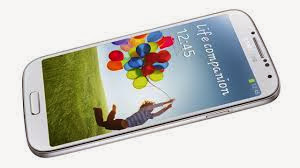
mobile phone users are an opinionated bunch and can argue iOS vs. Android until their faces turn blue. But what happens when you pull iPhone out of the equation and make it all about Android? Which Android phone is the best? We put the Samsung Galaxy S4, LG G2, HTC One, Motorola Moto X, and Google Nexus 5 side-by-side (by-side-by-side-by-side). Here’s a detailed look at how they stack up, along with a full spec comparison table to compare all the little bits. Processing power The geekiest, and most obvious way to compare phones is straight horsepower … err, processing power. We’ll give you the short and the long on this. In short: all five of these phones are plenty powerful and would be at the top of the pile no matter what mobile device you compared them against. In reality, we don’t really know. Both Samsung and HTC are accused of messing with benchmark test results on their phones, and it’s impossible to say if LG, Google, and Motorola (also Google) aren’t doing the same. There are some things we do know, however. HTC One and Galaxy S4 are disadvantaged because they came out right before summer. Both run on Qualcomm Snapdragon 600 processors, which are an older model of the higher-end Snapdragon 800 processors in the Nexus 5 and LG G2. The Quadrant test, and others, show the LG G2 to be far-and-away the winner, and we’d stand by that ruling. Overall, the LG G2 seems to be the fastest device we’ve used, but the Nexus 5 is highly comparable
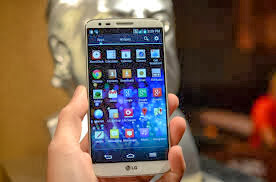
.LG G2 The Moto X does lose this category, but only because we’re looking at sheer processing power. The X has a new kind of chipset that’s broken into eight cores. The X8 chipset has a Snapdragon S4 Pro inside it, but it also has dedicated processors for motion, graphics, and other sensors. It takes a very different approach, and we consider it a worthy entrant and a high-end phone, despite what some say. Winners: LG G2 and Nexus 5 Pixel power This, for once, is a pretty simple category. Unfortunately, the Moto X comes out at the bottom of the stack with a 1280 x 720 pixel 4.8-inch screen. It still looks fantastic, especially because Motorola takes advantage of the deep blacks of its AMOLED screen, but Moto X doesn’t pack nearly as many pixels as everyone else. The HTC One, Galaxy S4, Nexus 5, and LG G2 all have Full HD, 1920 x 1080 pixel screens that hover around 5-inches. Our favorite is the LG G2 because it manages to squeeze in a 5.2-inch screen in a size about equal to the others thanks to a razor-thin bezel; that, and LG’s LCD screen is vibrant and beautiful, much like last year’s Optimus G. The HTC One is also impressive because it packs the most pixels into the smallest screen (4.7 inches), if that kind of thing impresses you. Again, to reiterate, even the Moto X has a good screen here. It’s unlikely anyone outside of hardcore screen nerds will be able to tell the difference between these screens. Winner: LG G2 Camera If you love to snap away with your phone and capture everything around you in every way possible, the camera can be a major selling point. We’ve seen a lot of companies pack in the megapixels behind their lenses in hopes of upping the photo quality. The Galaxy S4 and G2 are prime examples of this, pumping up the rear camera to 13 megapixels. The Moto X trails just a bit behind at 10 megapixels, and all three of those devices have essentially the same front-facing camera. The Nexus 5 has perhaps the least impressive camera of the bunch at just 8 megapixels, though it does have the additional optical image stabilization. The HTC One is the only one that doesn’t have an issue going with the smaller number in pixel count, opting for 4 ‘Ultrapixels.’
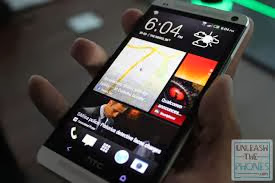
HTC ONE However, as we know, megapixels no longer tell the full story (if they ever did). In our experience using each of these cameras, HTC’s One stands out for producing great shots in a variety of conditions. LG’s G2 also stands out for its ability to focus on up to nine things at once, though the app can get a little laggy when that feature is on. The Nexus 5 has had the most difficulty so far, and we’re hoping that a software update will fix some of its issues with focusing and consistency. Galaxy S4 is alright, as is Motorola’s Moto X, but neither camera impresses us. None of these cameras live up to the standards set by the iPhone 5S or Nokia Lumia 1020, but we’re talking about Android today. Finally, Moto X wins the special prize for how easy it is to turn the camera on. Thanks to its motion processor, you can flick your wrist twice to turn on the camera, eve when the phone is on standby. Winner: HTC One (with kudos to LG G2 and Moto X) Software updates Sadly, buying an Android phone usually means that you’re probably stuck with the exact OS you purchased for two years. Google releases updates to its operating system twice a year, and patches every couple months, but because updates must go through manufacturers, and wireless carriers, they usually don’t happen at all. All five of these phones are, at least, running Android 4.2. Google is promising an Android 4.4 update for the Moto X this year, and Samsung has promised an update for the Galaxy S4. HTC has already released Android 4.3 for the HTC One, but we don’t know when, or if, Android 4.4 KitKat will be on the way. The only way to really ensure that you get updates is to buy a Nexus 5. Like an iPhone gets updates directly from Apple, this phone gets updates directly from Google; there is no middle man involved. Winner: Nexus 5 The Hot Stuff award These aren’t ugly phones, but the one phone that has stood out this year, if you’re evaluating looks, is the HTC One. Thanks to its beautiful aluminum frame, you’ll always get compliments if you own a One. As a bonus, the One’s good-looking speaker grills also provide excellent sound for a phone, and its directed at you, unlike many phone speakers, which are placed on the back. Winner: HTC One Battery Life We’ll keep this brief because no matter what smartphone you buy, your battery life will never be all that great. The LG G2 provides the best battery life out of this pack of phones, with life extending up to a day and a half. The Moto X also, somehow, keeps its charge for a little more than a full day unless you’re doing something crazy. The rest of these phones are fine, but you’ll need to charge up before you go to bed. Winner: LG G2 (Runner up: Moto X) Hold and feel By far, the most comfortable phone to hold here is the Moto X. It has a curved design to it that perfectly fits your hands. And despite having a 4.7-inch screen, its thin bezel gives it an overall footprint of a much smaller phone. No other phone comes close to feeling as natural in your hand as the Moto X. LG’s G2 is notable because of its power and volume button location. LG placed these buttons on the back-center of the phone instead of the sides. This lets you more easily control the phone with one hand, and means you don’t have to always shift your grip to reach the top and bottom of the screen. Winner: Moto X (Runner up: LG G2)
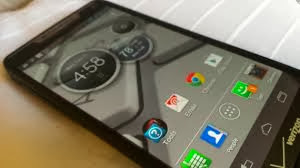
MOTO X Special Abilities Specs are fun, but what’s the real reason you pick one phone over another? Sometimes it’s the gimmicks. Here are the coolest aspects of each of these phones. Moto X takes voice to the next level: Aside from being built in the USA (Texas) and being the first phone to offer a variety of color customizations, the Moto X has a lot of secret powers. The game changer is its Google Now integration. Thanks to a special language/sensor processor inside it, you can speak commands to Google Now (which is like Siri) even if the Moto X is on standby. This sounds small, but it really got us to start using voice for the first time. By making it possible to use voice without even picking up the phone, it becomes convenient. We also like Motorola’s Active Notifications. Every time you pick up the Moto X and look at the screen, it will detect that you’re moving the phone and show you the time and a recent notification on a black screen. You wouldn’t believe how this small, smart ability to show you the time and a notification before you press a button adds to the device. LG G2 lets you turn on the screen by tapping it: LG has packed in a ton of software features like the ability to have mini apps run on top of other apps, and the ability to save apps in place. Our favorite ability is simpler, though. You can turn the G2′s screen on or off by tapping on it twice. You have to be on the home screen to turn the phone off like this, but being able to turn it on without hunting for the power button is nice. Galaxy S4 has a removable battery and SD slot: We often forget about removable batteries and MicroSD cards, but for some, these are vital. The GS4 is the only one of these devices that lest you add storage and carry extra batteries with you. Nexus 5 gets updates and costs $350: Aside from always getting updates fast and directly from Google, the big draw of the Nexus 5 is that it’s unlocked and costs half the price of the rest of these phones with no major drawbacks. Most of these devices cost $200 with a two-year contract, but you can buy a Nexus 5 for $350, never sign another two-year deal, be free, own your phone, and take it to another carrier if you would like. HTC One comes with 32GB built in: The Galaxy S4 may have a MicroSD slot, but HTC’s phone comes with 32GB out of the box. This means you may not need an SD card at all. And the winners are: Moto X and LG G2 If we had to recommend a phone to you, it would depend entirely what carrier you’re on. Overall, the LG G2 and Moto X are our favorite Android phones this year. If you’re budget-strapped, we highly recommend the Nexus 5, and if you happen to be on AT&T, be sure to check out the Galaxy S4 Active, which is just as good as a Galaxy S4, but waterproof (as in, more awesome). Verizon’s Droid Ultra, Droid Maxx, and Droid Mini also have all of the Moto X’s special features, so if they are on sale, go for it. T-Mobile owners could also look at Sony’s Xperia Z, which has a full glass design, but is also waterproof. Overall, any of these five phones would be a solid choice, and they are all available for just about every major wireless carrier in the United States. Try them out at a store and pick whichever one makes you happiest. There isn’t a bad choice. We hope that the info we gave you will help you make the right choice for you. Full specs Which phone has the biggest battery? Which has the latest version of Android? Which is the lightest? These are the smaller questions best left to a proper chart. And we have one for you. (By the way, the answers are the LG G2, Nexus 5, and a three-way tie between the Galaxy S4, Moto X, and Nexus 5, respectively.) Galaxy S4 LG G2 HTC One Moto X Nexus 5 Size 136.6 x 69.8 x 7.9 (mm) 138.5 x 70.9 x 8.9 (mm) 137.4 x 68.2 x 9.3 (mm) 129.3 x 65.3 x 10.4 (mm) 137.8 x 69.1 x 8.6 (mm) Weight 130g 143g 143g 130g 130g Screen 5.0 inch Super AMOLED 5.2-inch 1080p LCD 4.7-inch LCD 4.7-inch AMOLED 4.95-inch Full HD IPS Plus Resolution 1080×1920 pixels 1080×1920 pixels 1080×1920 pixels 720×1280 pixels 1080 x 1920 pixels OS Android 4.2.2 with TouchWiz UI Android 4.2.2 with LG UI Android 4.1 with Sense 5.0 UI Android 4.2.2 Android 4.4 Storage 16/32/64GB 16/32GB 32/64GB 16/32GB 16/32GB SD Card Slot Yes No No No No Processor Quad-core Snapdragon 600 Quad-core Snapdragon 800 Quad-core Snapdragon 600 Motorola X8 chipset Quad-core Qualcomm Snapdragon 800 RAM 2GB 2GB 2GB 2GB 2GB Connectivity Wi-Fi, 4G LTE, HSPA+, NFC Wi-Fi, 4G LTE, HSPA+, NFC Wi-Fi, 4G LTE, HSPA+, NFC Wi-Fi, 4G LTE, HSPA+, NFC Wi-Fi, 4G LTE, HSPA+, NFC Camera Front 2MP, Rear 13MP Front 2.1MP, Rear 13MP Front 2.1MP, Rear 4UP Front 2MP, Rear 10MP Front 1.3MP, Rear 8MP Bluetooth Yes, version 4.0 Yes, version 4.0 Yes, version 4.0 Yes, version 4.0 Yes, version 4.0 Battery 2600mAh 3000mAh 2300mAh 2200mAh 2300mAh Batt. Removable? Yes No No No No Quadrant Score 11,381 17,700 12,194 8,519 9,100 Charger Micro USB Micro USB Micro USB Micro USB Micro USB Marketplace Google Play Store Google Play Store Google Play Store Google Play Store Google Play Store Ave. Price $200+ (with 2-year contract) $100+ (with 2-year contract) $100+ (with 2-year contract) $100+ (with 2-year contract) $350+ (with no contract) Availability AT&T, Sprint, T-Mob, Verizon, U.S. Cellular AT&T, Sprint, T-Mob, Verizon AT&T, Sprint, T-Mob, Verizon AT&T, Sprint, T-Mob, Verizon, U.S. Cellular AT&T, Sprint, T-Mob, Google DT Review Score 4 out of 5 4.5 out of 5 3.5 out of 5 4 out of 5 4 out of 5

Saturday, 8 February 2014

GOODNEWS TO KENYANS''''FREE INTERNET COMING YOUR WAY COURTESY OF MIKE SONKO...TWEET AND SHARE THIS NEWS

Saturday, 8 February 2014 - by Unknown · - 0 Comments

Mike Sonko the Nairobi senator is never short of surprises,from having a photoshop session with the late former south AFrican leader Nelson Mandela to his affection to the needy in the society.Currently being ranked as the most popular and loved senator in Kenya.Mike Sonko shocked many Kenyans when he announced to his fans on facebook that he had plans to avail free wifi internet to Nairobians strictly free from charges.Days later the visionary leader who is famous for his caring attitude to the low class urban dwellers announced on the progress so far concerning the project Watu wangu[my people], last week i promised you free WIFI internet. To bring this dream to reality, i have met with the major internet providers: Safaricom technical team lead by christine nyambura(Client service manager), Agness Wanjiku (Territory Executive), Kelvin kangwe, william opundo and SPIDD Africa technical team lead by Francis Adungo CTO. In our meeting we discovered that for us not to interfere with existing internet cyber cafes, we had to introduce Hot spots where this services will be available to all the major estates and slum areas. The main aim of this project is to provide Nairobi residents and visitors with free internet access for light browsing, easy access to county information updates and social networking. Lets suggest a USERNAME:- mngependa iwe Nairobi ama Nairobian?? PASSWORD nayo iwe Mike Sonko, Senator Sonko ama gani??? Be the boss. Amueni[decide]The documented information acted as a proof to the senators keeping part of his bargain and making his promises a reality to the city dwellers.Following by the comments on the posts Kenyans expressed their gratitude and visions towards the project.Once the free wifi is installed Nairobi will become the first city in the world to offer free wifi internet to its dwellers.Mike Sonko will definately go down the archives as the first man to initiate free wifi internet services to a densily populated city .This will see the emergence of Kenya as a tech hub giant in the world leaving Nigeria and South Africa struggling for their slots in Africa ...follow@kenyatimes

Wednesday, 15 January 2014

MOST ESSENTIAL WORDPRESS PLATIFORM PLUGINS ON A WEBSITE

Wednesday, 15 January 2014 - by Unknown · - 0 Comments

Wordpress cms being among one of the most popular platform for creation a multifunctional website offers offers a lot of plugins and templates for free so as to enhance your blogging experience.wordpress plugins can turn your website to anything that you dream of in your blogging career Essential WordPress Plugins For Site Functionality

Contact Form 7 The famous plugin for creating contact forms so that your visitors can email you. Disqus Disqus makes it easy for visitors to leave comments as well as gently promoting your blog posts on other related sites for free. FeedBurner FeedSmith Feedburner makes it easy for visitors to subscribe to your RSS feed as well as providing information on how many subscribers you have and which of your blog posts are getting the best responses. Pretty Link Lite Pretty Link can turn long, unwieldy website addresses into short, snappy ones. Don’t send people to http://www.domain.com/fruit/apples/grannysmiths but instead use this plugin to create a short link on your own domain (like http://www.mydomain.com/gsmiths) that then refreshes to the full U Privacy Policy A privacy policy doesn’t just look professional and add an element of trust to your site – it’s also essential if you’re monetizing your website with Google Adsense. This plugin provides a simple “fill in the blanks” way to add a privacy policy to your site in minutes. RSS Footer Easily add a message to the end of posts in your RSS feed. Use RSS Footer to promote your mailing list, a product you’re selling or simply to link back to your main site WordPress Popular Posts Impress new visitors to your site and reduce your bounce rate by displaying your most popular content prominentl WPSubscribers The “killer app” for growing your blog is to build your own mailing list. Despite testing dozens of competing products over the last few years WPSubscribers remains one of my most essential WordPress plugins. It enables you to create a range of optin forms including popups, exit popups, signup forms in your posts themselves and within your navigation menu. Ontop of this WP Subscribers will split test multiple forms to find those that drive the highest response rates for you. Essential WordPress Plugins For Site Maintenance Automatic WordPress Backup Accidents happen; web hosts go out of business, hackers infect sites with malware and new plugins can crash your blog. But don’t let all your hard work go to waste. Just as you should be backing up your home computer as insurance against disaster, Automatic WordPress Backup will save a copy of your site to an external source just incase. These backups can be set up to happen automatically and if you ever have a problem then clicking one button will download the last “safe” version of your site and have you up and running again in minutes Broken Link Checker Broken links don’t just annoy your visitors, they can even affect how the search engines rank your site. But it’s very difficult indeed to keep tabs on all the links on your site, and that’s where Broken Link Checker comes in handy. This plugin scours all the links on your site (both internal and external) and then reports any issues it finds. The plugin will even email you automatically to alert you if it ever finds a problem. Generate Post Thumbnails More and more WordPress themes are using thumbnails these days to attractively display your posts. Sadly actually creating these thumbnail images can be a long and arduous task so thankfully the Generate Post Thumbnails will do it all for you with the click of a button. Be aware that on a large blog this process may take some time – but it’s still a lot quicker and easier than doing it all manually. Google Analytics for WordPress This plugin makes it super-simple to add your Google Analytics tracking code to every page of your site without having to manually paste in the code. Simply install the plugin, authorize it to access your Google account and you should start to see traffic information appearing almost instantly. Search Meter Record the searches that people carry out on your site with this simple little plugin. The information it provides can be very useful for ensuring you’re meeting the needs of your visitors as well as providing ideas for future blog posts. W3 Total Cache Slow loading websites annoy visitors and can also result in lower search engine rankings in Google. Speed up your WordPress blog with this powerful plugin that is trusted by some of the biggest names on the Internet. WP-Optimize WordPress has a nasty habit of filling up it’s database with unnecessary junk such as spam blog comments, old post revisions and unused categories. Another handy way to speed up your WordPress blog is to eliminate all this unnecessary clutter with WP-Optimize. WP Smush.it Images might make your site more attractive but they also slow down the loading time of your site. Yahoo’s Smush It service reduces the file size of your images without compromising on their quality so they load more quickly and WP Smush.It is an automated way to run all your images through their service in one go Essential WordPress Plugins For Post Creation Compfight Instantly add visual appeal to your blog posts by adding Creative Commons images from Flickr with this plugin. Not only does it have a powerful search feature but it will also add the necessary credit link to your article to keep you legal. Editorial Assistant by Zemanta Linking out to other great articles has a number of benefits; it not only makes your site more useful to your visitors but it can also help boost your search engine rankings because outgoing links to high quality sites can be seen as an indicator of a useful article. Lastly, linking out to other sites in your niche can also help to get you on their “radar” and enocurages networking opportunities. Zemanta will read all the blogs in your feed reader and then offer up suggestions of related content which you can easily add to your post content with the click of a button. Essential WordPress Plugins For SEO Dagon Design Sitemap Generator Finding content on a blog isn’t always easy, especially when you’re regularly adding new content. Creating a sitemap that carefully lists all of your content in one easy-to-read destination can go a long way to not only helping your visitors but also the search engines find all the content you’ve so lovingly created. Google XML Sitemaps Creating a sitemap in XML format is a perfect way to ensure that Google and the other major search engines are aware of all your content. Simply use this plugin to create your sitemap and then enter it’s address is your Google Webmaster account. You might be surprised (as I was) by how many of my posts Google weren’t even aware of. SEO Smart Links The concept of SEO Smart Links is a simple one – it allows you to automatically link certain words to relevant posts on your site. Just written an amazing article about Google Adsense? If so, you can use this plugin to instantly build internal links to it by simply specifying that whenever you use the word “Adsense” in other posts that word will be turned into a hyperlink back to your original post. WordPress SEO WordPress SEO is an essential WordPress plugin. not only does it offer everything that old plugin used to, it even analyses your posts and offers suggestions for improving your onpage SEO. – and rankings prove it’s effectiveness. Essential WordPress Plugins For Social Media AuthorSure Google authorship is becoming ever more important for getting found and ranked in Google. Sadly setting up your author profile is anything but easy which is where AuthorSure comes into play. This plugin contains all manner of settings to ensure that no matter what WordPress theme you’re using you’ll be able to link your WordPress site to your Google authorship account simply and quickly. Facebook The official Facebook WordPress plugin offers a range of benefits for bloggers engaged in social media including the ability to add viral Facebook comments to your site, recommend content to your visitors based on Facebook interactions and grow your following with the built-in like box widge Recent Tweets Enhanced Widget 2.3 If you’re really sharing great content on Twitter and want to build your followers then the Recent tweets plugin does exactly what it suggests; it displays a list of your most recent tweets in an attractive and easy-to-read manner so that visitors to your site can see what you’ve been tweeting and easily start following you themselv Show Twitter Followers Social proof is an important concept when it comes to Twitter and this handy little widget will display a load of your follower’s profile pictures to not only show off about how many people like what you have to say but also to show they’re real humans rather than spam-bot Tweet Old Post Want more Twitter traffic? If so, this plugin will automatically grab a previously-published post from your blog and then tweet it out to your followers. Set it up just once and you’ll find that as your follower numbers grow, so too will your social media traffic without you needing to lift a finger. WP Socializer There are a lot of WordPress plugins that allow you to add social sharing buttons to your site and frankly it can be a challenge deciding between them. I’ve jumped from one to the next but keep on finding myself back with this little gem. Why? Well it may be a little more technical to set up than some competing plugins but I find these extra custmization options mean that no matter what theme I’m using or what layout I want I can always get my social sharing buttons looking just right

WAYS TO GET MORE TWITTER FOLLOWERS ON SOCIAL MEDIA

- by Unknown · - 0 Comments

In a desperate attempt to gain more twitter followers on twitter many people revert to spamming which is unethical to your twitter handle reputation

Many tweeps with “follower envy” end up using automated “follower exchange” networks to build a following of people who really don’t care what they have to say, or use outsourcers on Fiverr and suchlike to build a following largely consisting of bots and hacked accounts. The important thing to remember with regards to Twitter is that not only is it about volume of followers but also the quality of those followers. A handful of “true fans” that really care about what you have to say, interact with you and take action on your tweets is far better than thousands of followers who couldn’t care less who you are and what you say. So how do you get more Twitter followers free using legitimate, non-spammy means? Luckily, as you may have guessed from the title, that’s exactly what we’re about to cover. In essence though they all come down to two main points which are worth bearing in mind at all times: 1) Make your Twitter account highly visible to people that will be interested in your tweets 2) Offer exceptional value so that others will want to receive your tweets If that sounds a little over-simplistic for you, let’s dive a little deeper into 36 free ways you can effortlessly get more Twitter followers free… how to get more Twitter followers free Get More Twitter Followers Free By Networking Twitter is, at it’s core, a communication tool. That means that networking is an essential part of the Twitter experience. It not only enriches your own online activities but also serves as a powerful way to build your follower base. Here are a sample of tools and tips to help you “get involved” and get more followers to boot: 1) Follow Others Use tools like Twitter search, Twitter recommendations, FollowerWonk and Klout to find other people in your niche worth following. By following others you’ll not only find that some of them follow you back but it’s also the first step in getting involved in the conversations. 2) Engage Once you’ve started following interesting people in your niche, take some time each day to read your feed and respond to relevant tweets. You can also initiate conversations using the @ tag to ask questions, make observations or comment on a tweeps latest blog post. Engaging others helps show that you’re a real person rather than a bot (of which there are many on Twitter) and also helps you to more attract more Twitter followers free. 3) Retweet Find a tweet in your stream that you like the look of? Share the love by retweeting it to your own followers. Doing so not only adds value to your own Twitter account but helps to put you on the radar of the originating tweeter thus potentially building your network and building recipricity within your niche. 4) Easy Reweet One handy tool for retweeting interesting tweets is Easy Retweet. Every time you retweet something on the site you’ll earn points. Then, next time you publish a new blog post and tweet about it, you can feature your tweet on Easy Retweet and use those points to have other people retweet your message. Doing so not only helps those retweeters discover your Twitter account and blog but spreads the message of your blog much further than you could do on your own. More visibility + value = more followers. 5) Just Retweet It Just Retweet offers a similar service to Easy Retweet but is focused almost exclusively on the online marketing/ecommerce niche so will be of less use if you’re blogging and tweeting about mountain bikes, reptiles or home Once again though you’ll have the opportunity to share great content with your followers while building points that you can use to increase the spread of your own content across the Twitter platiform 6) Join A Tribe Triberr enables anyone on Twitter to join a tribe of other like-minded tweeps. If you can’t find anything suitable you can even start your own tribe (as I have) and then recruit other people into it. As a member of a tribe you’ll get a feed of all the latest blog posts that your tribe has published and you can send out a tweet to your followers about it with the click of a button. Some of the tribes have a huge reach so by networking with other people who are already successful on Twitter you’ll have your content – and Twitter account – put infront of a whole new audience. In doing so it’s possible to pick up loads more Twitter followers free who like what you’re saying. 7) Join A Twibe If Triberr is all about amplifying your message so that it gets sent out to a range of Twitter accounts then Twibes is all about a group of people discussing a specific topic. If you can find some Twibes that are closely related to your niche topic then it’s a great opportunity to get your account noticed, engage some passionate tweeps in some interesting discussion and, hopefully, build your following along the way. 8) Twitter Chats Along the same lines, organized Twitter chats ensure that you’re not just sending out your tweets into cyberspace where they sit unloved and unread. Instead, Twitter chats bring together groups of people on Twitter rather like Twiber making it a fantastic way to get more Twitter followers free. Use sites like TweetChat or a simple Google search (my niche + “twitter chat”) to find existing Twitter chats and get involved. 9) Answer Questions If you’re creating amazing content to publish on your website then here’s a great way to not only drive extra traffic to your site but also position yourself as an expert and build your Twitter followers alongside. InboxQ is a free service that will search Twitter for questions that other people have asked based on keywords that you enter. It’ll save these keywords in the form of a campaign and if you install their browser add-ons they’ll keep a constant eye on Twitter and alert you when they find anyone with questions relating to your website. You can then either answer their question directly or provide a link to a useful article on your site. 10) Thank Your Sharers If someone shares your latest blog post with their followers then they’ve shown that they’re interested in your content. Engaging these people can be a great way to build a network on Twitter and encourage future shares. Backtweets is a useful free tool for finding people who have tweeted out a link to your latest blog post. Once you find some sharers, consider following them and also sending them a personal message thanking them for sharing your content. Not only might they then follow you themselves but they’ll also be more likely to retweet your content in the future leading to more Twitter followers free. 11) Follow Your Commenters We all know how tough it can be to build up a regular readership at your blog and encourage comments. Fortunately those people who do take the time to comment on your site are highly engaged so following them and interacting with them on Twitter can be a very smart idea. If you’re using WordPress as a content management system then the free Meet Your Commenters plugin will try to pull the social profiles of anyone who leaves a comment on your blog. Then, simply follow and interact. Offer Value There is no point in trying to get more Twitter followers if you’re really not tweeting anything of value. If you do so, your promotion will be far less effective due to the number of un-follows that you’ll get. But offering value in your tweets isn’t just about keeping your existing followers happy. When you offer real value in your tweets you also significantly increase the chances of your updates being retweeted or quoted on other blogs – and both of these aspects can further increase your follower count. Here are a few simple ideas to create valuable tweets that your followers will enjoy: 12) Create An Online Newspaper Paper.li offers the opportunity to create an attractive online newspaper focused on your niche. You simply choose specific keywords, Facebook pages and Twitter accounts that you’d like to include and each day your newspaper is updated with the latest content from around the web. These online newspapers can make a great “starting point” for people interested in your topic. Furthermore, when tweets from other people are included in your newspaper they’ll be notified on Twitter that you’re featuring them – encouraging them to take a closer look at your work and, we hope, get you more Twitter followers free. 13) Use Hot Hashtags Hashtags operate on Twitter as a way to “organize” and search for tweets. Think of them as keywords in the search engines or tags on your blog. The fact is though that when a new hashtag appears on Twitter it can often go viral very quickly, and by using relevant trending hashtags you’ll help a whole new audience discover your Twitter account. Sites like Trending Hashtags or your good old-fashioned plain old Twitter account can be great resources for finding “hot” hashtags to try and include in your tweets. 14) Tweet Old Content If you’re a WordPress blogger then the Tweet Old Post plugin can automatically select one of your blog posts at random and then publish the link in your Twitter stream. Assuming your blog posts offer genuine value and you’re not over-using the plugin and thus deluging your followers with messages then the plugin can help your followers find useful content. Not only can this simple “one time set-up” process increase traffic to your blog (thanks to clicks on your links) but if you include relevant hashtags these tweets can be found by non-followers. I have personally seen significant increases in Twitter followers as a result of people finding these tweets and deciding to start following me when they like what they see. 15) Track Your Clicks How do you know what tweets your followers enjoy? Clearly if more valuable tweets are more likely to be shared, thus increasing your Twitter followers, then it makes sense to find out. A range of Twitter analytics tools such as TweetStats will help you uncover the tweets that do best or for an ultra-simple solution consider using a link-shortener like Bit.ly that will show you how many people actually click the links that you tweet to your followers. By analyzing the tweets that get the best response you’ll be able to focus on sharing the most engaging forms of content to your followers and get more Twitter followers free. 16) Use A Feed Reader A great way to find valuable content to share on Twitter is to set up a feed reader like Feedly, then fill it with relevant content. There are two great solutions; add industry-specific blogs and additionally add Google Alerts for specific keywords. While setting this up the first time will take some effort, thereafter you’ll find that you receive a constant stream of interesting, high-quality content. Pick out those content pieces that will be of greatest interest to your followers and get tweeting those resources. 17) Find Popular Tweets Sites like Tweet Meme and Topsy allow you to find tweets that are already popular. Using keywords that relate to your niche you’ll not only be able to get a better idea of what tweets are performing best for your peers but you can also share these top tweets with your followers safe in the knowledge that they’ll probably perform well and help you attract more Twitter followers free. Cross Promote Your Profile It’s unlikely in this day and age that Twitter is the only marketing channel you’re using. You likely have a website, a blog, a Facebook page and so on so use these external sites to cross-promote your profile and encourage as many people as possible to follow you on Twitter. Here are a few ideas to set your mind working: 18) Stream To Facebook It’s easy to add your Twitter updates to Facebook. Assuming you’re posting different content on the two sites then adding your tweets to Facebook shouldn’t over-whelm your fans. Furthermore if you’re offering value in those tweets then you should find that a number of your Facebook fans end up following on Twitter too providing you with yet more Twitter followers free. 19) Follow Me Buttons If you have a website or blog there are a number of ways to add a simple “follow me” button to gently promote your Twitter account. Using a tool such as Twitters official button visitors to your website will be made aware of your Twitter account and can easily start following you with a click of their mouse. If you already have a significant number of Twitter followers consider using one of the buttons that shows your follower count. The social proof of a large following should further help to increase your response rates. 20) Website Widgets Even better than a plain-old button, actually adding your Twitter stream itself to your site can be a smart idea. Why? Because it allows potential followers to actually get a “free sample” of the sort of tweets you send out. It’s therefore far easier for them to make a fair assessment of whether or not they want to follow you. And, if they find you’re posting quality tweets that they’d be happy to receive you’ll find it’s a great – and very easy way – to get more Twitter followers free. Even better, as a widget takes up more space than just a button it should get more attention from your site visitors leading to a higher proportion of your traffic following you. 21) Click To Tweet When you write a new article for your site, consider if there are any handy little nuggets of information that might be suitable for tweeting. Example might include interesting statistics or relevant quotes. In situations where these exist, consider using the Click To Tweet service to make it easy for anyone to tweet out these snippets with the click of a button. If you ensure the tweet that is sent out includes your Twitter name or a link to your blog post then you’ll find a whole new audience will be introduced to your site and your Twitter profile. 22) Tweak Your Social Sharing Buttons Most bloggers use some form of social sharing buttons to enable visitors to share their content on Facebook, Twitter and so on. But one effective tweak to get more Twitter followers is to use a plugin like Tweet This that will allow you to customize the “default” tweet when someone goes to share your article on Twitter. A typical share will involve your post title and a direct link to your article. However adding your Twitter account name into the tweet can help attract more Twitter followers free as it travels alongside your content. 23) Tweet To Pay Consider giving something of value to people who tweet about it. Ebooks, simple software applications or access to a private area of your website are all suitable “bribes” to encourage tweets about your site. Using services like Pay With A Tweet and ensuring your Twitter handle is included in the default tweet can be an easy way to generate more Twitter followers. 24) Start A Twitter Contest Asking your website visitors to pay for a free gift by tweeting about it is one thing – but why not take it to another level by turning your giveaway into a contest? Services like Interactwive will help you run a contest to not just attract more Twitter followers free but also increase the number of shares that your content receives. You can then offer up an additional prize for the “winner” to encourage as many participants as possible. 25) Comment With Your Twitter Account A range of plugins and blog commenting systems will let you include details of your Twitter account when you leave a comment on a post. Take the time to research quality blogs in your niche that allow this so that you can add them to your feed reader and use every comment you make as a way to drive more visitors over to your Twitter profile. 26) Guest Post With Your Twitter Account We all know that guest posting is one of the best ways to build links, traffic and readerhsip for your blog. But if the focus is on building your Twitter followers as much as your blog traffic then consider including a link to your Twitter account in your author bio file. A guest post on a high traffic site can lead to hundreds of new impressions on your profile and help to grab more Twitter followers free. Perfect Your Profile For such a basic site, there are a surprising number of options when it comes to setting up your Twitter profile for success. Follow these best practise rules to ensure that your profile is easy to find and also encourages drive-by visitors to click the all-important “follow” button: 27) Use Keywords use the Twitter search function to find more people to follow. Put some thought into exactly what types of keywords your potential followers will be using and try to weave these into your Twitter bio. I have several different Twitter profiles that have achieved top search rankings as a result of careful keyword choice and as a result these accounts grow on their own every day because every time someone searches for the keywords targeted I pop up at the top of the results. 28) Add A Photo There are a huge number of fake accounts on Twitter that have been set up by spammers. Adding a photo of yourself to your Twitter account sounds too simple to have any real benefit but you’d be mistaken. By allowing people to visualize you as a real person you greatly increase the chances of getting more followers. Furthermore, appreciate that these tiny profile pictures appear in the Twitter search results that potential followers of yours will see. As a result it’s smart to ensure that you have an eye-catching picture so you stand out from the crowd and attract more attention from potential new followers in the search listings. 29) Make A List Twitter lists help you to keep the people you follow neatly organized but searching through other publically accessible Twitter lists is also a great way to quickly find lots of interesting people to follow. By creating a Twitter list, that includes your own account among others, and carefully naming it with keywords in mind you’ll find that you can quickly attract more Twitter followers free. Even better as may of these people will follow the whole list rather than just one individual on it, it’s a great way to reward other tweeps that you enjoy hearing from as you’ll also be helping to build their follower count too. Get Listed In Directories Thanks to Twitter’s own internal algorithms it’s easier than ever to find people worth following. However there are also a range of Twitter directories that list people worth following. Registering with these sites is quick and simple so it’s a worthy investment to get more Twitter followers free. The top directories by traffic numbers right now are #30: We Follow, #31: Tweet Find and #32: Twellow. Tweet Properly A huge amount of research has been done on what makes a tweet “good” – that is tweets that get responses in the form of clicks, retweets, responses and so on. Kudos goes to Derek Halpern of Social Triggers for many of these findings which are summarized below: 33) Time Your Tweets Tweets only have a very short lifespan so if you’re to actively engage with your followers it’s important to tweet when as many as possible are online. Tools like Social Bro and Tweriod allow you to analyze the best possible time to send out tweets, hopefully leading to as many retweets as possible. Furthermore, once you’ve decided on the optimum times, Buffer will enable you to queue up your tweets in advance so that they go out at the perfect time – even if you’re not at your computer. 34) Right Length If a key way to get more Twitter followers is to to encourage retweets then it’s important to consider the length of your tweets. Remember that when someone retweets one of your updates, Twitter will automatically add the text “RT @YourProfile” onto the beginning of the tweet. So, as Twitter offers you a maximum of 140 characters, try to ensure your tweets are short enough to include the “retweet text” at the beginning without going over the 140 character limit. 35) Use Hashtags Hashtags can be thought of as “keywords” that help people – followers or not – to find your tweets through Twitter’s search function. In other words, by ignoring hashtags you’ll make it far harder to get your tweets and profile found. With some of my Twitter accounts all I do is post valuable content and include two or three relevant hashtags and I see my followers grow daily so this really is a powerful strategy. So in short, consider the content of the tweets as you send them out and add a few hashtags. Then keep track of the results you see so that you can gently build up a list of hashtags that perform for you like clockwork and use these “winners” on a consistent basis. 36) Give Credit The last point worthy of mention here relates to crediting others for their content. Are you tweeting a link to someone else’s content? If so, before you send out the tweet see if you can find their Twitter handle and include it in your tweet.

Subscribe

© 2013 KENYA TIMES DAILY . All rights reserved.